
Local business directories are one of the easiest, most effective ways to earn backlinks, and most business owners don’t even realize the opportunity they’re sitting on. This strategy costs nothing, works for any local service, from junk removal to plumbing to demolition, and helps you show up better in search. Here’s the full breakdown of how to find, submit to, and get indexed on local directories to boost your SEO.
Why Local Directories Matter
Backlinks matter. You’ve heard it before. But not all backlinks are created equal.
Local directories are relevant (other similar businesses are listed), are often free, and provide an easy way to build your online authority. These listings build trust with Google and help your business show up in local searches faster and stronger.
Step-by-Step: How to Find Local Business Directories (For Free)
This process was built in Harrisburg, Pennsylvania, but it works in any city. The goal? Find free local directories and get listed.
Here’s the exact method:
-
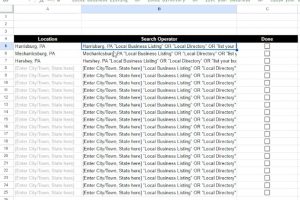
Use the spreadsheet (linked in the original tutorial) to plug in your city name.
-
The sheet uses a search operator formula that pulls up relevant Google search results like:
-
“Harrisburg business directory”
-
“Submit your business Harrisburg PA”
-
“List your business Harrisburg”
-
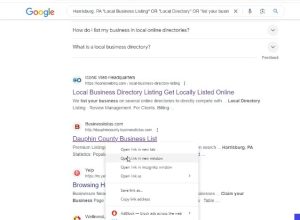
Copy the search phrase into Google.
-
Open the results in new tabs.
-
Look for submission options like “Add your business,” “Claim your business,” or “List your business.”
You’ll get a mix of pages—some general, some niche. Some may not apply. That’s normal.
What to Do With Each Listing
Once you find a legit directory:
-
Add your business: name, address, phone, email, website
-
Write a unique business description for each one
Yes, unique. Google values variety in backlinks, so don’t copy-paste the same description everywhere.
Need Help Writing Descriptions? Use This Prompt
If writing 10+ versions of your business description sounds overwhelming, there’s a shortcut.
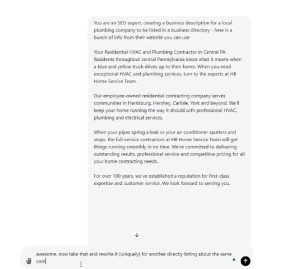
In the spreadsheet, there’s an AI prompt ready to go.
Use it like this:
-
Copy your company info or homepage text.
-
Paste it into the prompt in ChatGPT:
“You are an SEO expert creating a business description for a local [industry] company to be listed in a directory. Here’s their info…” -
Hit go.
-
Review, tweak, and repeat for each new listing. Let’s say you’re “HBM & Co.”—a home business in Harrisburg. Copy your homepage content, drop it into the prompt, and boom—you’ve got a custom-written description ready to paste into a directory.
Need another version for a different directory? Ask for a unique rewrite. Easy.
Keep Track of Your Submissions
In the spreadsheet:
-
Mark off the cities you’ve searched
-
Log the directories you’ve submitted to
-
Add notes like “Waiting for approval” or “Reach out to Sally”
This helps you stay organized and follow up when needed.
Real Directory Examples Found
While testing this strategy, several solid directories came up:
-
Trusted Local Directory – free listing options
-
LancasterOnline – local community profiles (some paid)
-
Yelp – you should absolutely be on Yelp
-
Central PA directories – might be niche or industry-specific
You’ll also run into irrelevant ones—health sites, elevator listings, etc. Skip those and move on.
Final Step: Get Indexed
Submitting isn’t enough.
Your listing needs to be indexed—meaning Google sees and registers the page.
Here’s how:
-
Use tools like Omega Indexer or IndexMeNow
-
Submit the URLs of your directory listings
-
Let the tool request indexing on your behalf
This makes sure your hard work actually helps your SEO.
Local Directories = Low Effort, High ROI
- Search your city + “submit business” using the spreadsheet
- Find local directories
- Submit your info
- Use AI to write unique business descriptions
- Track your submissions
- Get them indexed
This is a simple, repeatable system that builds authority and trust with Google, without spending a dollar. Need deeper help on indexing or how to optimize your listings? Let us know what you’re working on.