

6 REAL Reasons Why You Need A Mobile-Optimized Website
We’ve all heard the saying, “If you build it, they will come.” But what about that other saying: “If you build it right, they&...
A Crunchbase company profile gives people a quick way to understand your business, confirm key details, and connect your company to the right industry, location, team, and website.
The basic setup is simple: create an account, search to make sure your company is not already listed, add or claim the profile, fill out the key company details, and keep the page updated as your business changes.
A strong profile will not replace your website or SEO strategy, but it can support your online presence by giving investors, partners, journalists, prospects, and researchers another clear source of company information.
A Crunchbase company profile is a public business listing that can include details such as your company name, description, website, social links, headquarters location, industry categories, leadership, funding information, acquisitions, news, and other company data.
For startups, it can help investors and partners understand the company at a glance. For established businesses, it can support brand visibility and help create another source of business information online.
Your profile should answer a few basic questions quickly:
Think of your Crunchbase profile as a structured business summary. It should be clear, accurate, and easy to understand.
Before you add a company to Crunchbase, search for your business name first. This helps you avoid creating a duplicate profile, which can confuse users and make your company information harder to manage.
Here is a simple step-by-step table:
| Step | What to Do | Why It Matters |
| 1 | Create or log into your Crunchbase account | You need an account before adding or editing profile details |
| 2 | Search for your company name | This helps confirm whether a profile already exists |
| 3 | Claim the existing profile if one appears | This helps you manage or request updates to the right listing |
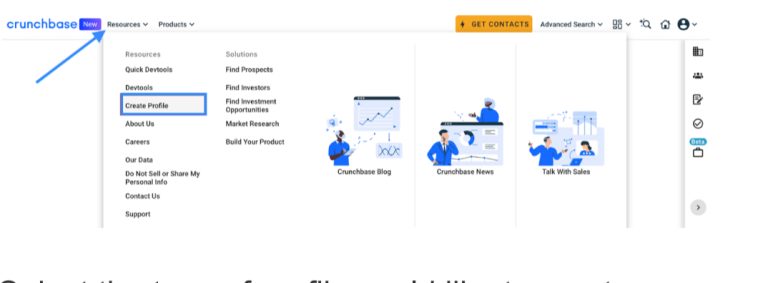
| 4 | Use Resources, then Create Profile | Crunchbase lists this as the path to add a new profile |
| 5 | Select the right profile type | Most businesses will choose an organization profile |
| 6 | Add your company details | This gives users and search engines clearer information |
| 7 | Save your edits | Your information needs to be submitted before it can appear |
Crunchbase’s own instructions say users can click Resources in the top navigation, then Create Profile, choose the profile type, enter the details, and save the edits.
Go to Crunchbase and create an account. Depending on the options available to you, you may be able to sign up through a social account or email.
Once your account is ready, search your company name before creating anything new.
If your company already appears, open the existing profile and look for available options to claim, edit, or request updates. If your company does not appear, create a new organization profile and begin adding the correct details.
Start with the information that matters most: company name, short description, website, social links, location, industry tags, and key people. You can improve the profile later, but the core information should be accurate from the start.

Creating the page is only the first part. The real value comes from making the profile complete, clear, and aligned with your brand.
Your description should explain what your company does in plain language. Avoid vague claims and buzzwords. A visitor should know within a few seconds what you offer and who you help.
A good description usually includes:
Keep it concise. Crunchbase users are usually scanning quickly.
Add your main website URL and any active social profiles that help confirm your business. LinkedIn is especially useful for companies because it connects your brand to your people, updates, and hiring activity.
Make sure your name, website, and location match your other business listings. Consistency helps reduce confusion.
Industry tags help people understand where your company fits. Choose categories that reflect your actual business, not every category you might loosely relate to.
For example, a marketing agency might select tags connected to digital marketing, SEO, web design, lead generation, or advertising if those accurately reflect the company.
Team details can help make the profile feel more complete. Add founders, executives, board members, or other public-facing leaders where appropriate.
This is especially helpful for startups, investor-backed companies, and businesses where leadership experience matters.
If your company has raised funding, add the appropriate funding round details. This can include the round type, date, amount, lead investors, and participating investors.
Funding information is one of the reasons many people use Crunchbase, so keeping this section accurate matters.
A high-quality logo helps people recognize your company quickly. Use the same logo that appears on your website and other major business profiles.
Avoid blurry, stretched, or outdated branding.
A Crunchbase profile should not be treated as a one-time task. Review it when your company changes.
Update the profile when you have:
Crunchbase notes that existing profile details can be edited from the profile page using the edit option.
A strong Crunchbase profile does not need to be complicated. The best examples usually share a few simple traits.
A startup profile should clearly explain the problem being solved, the market, the product, and the founding team. If funding has been raised, that section should be complete and accurate.
Example structure:
A service business profile should focus on what the company does, who it serves, and where it operates.
Example structure:
A marketing agency can use Crunchbase to explain its core services and market focus. The profile should connect the company to the services it actually offers without overloading the description.
Example structure:
Crunchbase is a user-contributed platform, which means profile creation and updates may not always go exactly as expected. Community discussions show users sometimes run into issues with editing access, duplicate profiles, missing confirmations, and profile updates.
Here are common issues to watch for:
Crunchbase can support SEO, but it should not be treated as a full SEO strategy by itself.
A Crunchbase profile may help your company’s online presence by creating another public page with your business name, description, website, category, and related details. This can support brand visibility, help people verify your company, and strengthen consistency across the web.
Crunchbase may help with:
It can also help search engines connect your company name with your website, industry, leadership, and other public business details. That said, Crunchbase alone will not make your website rank for competitive keywords. Your website, content, backlinks, technical structure, Google Business Profile, and overall SEO strategy still matter more.
The best approach is to treat Crunchbase as one part of your wider online footprint.
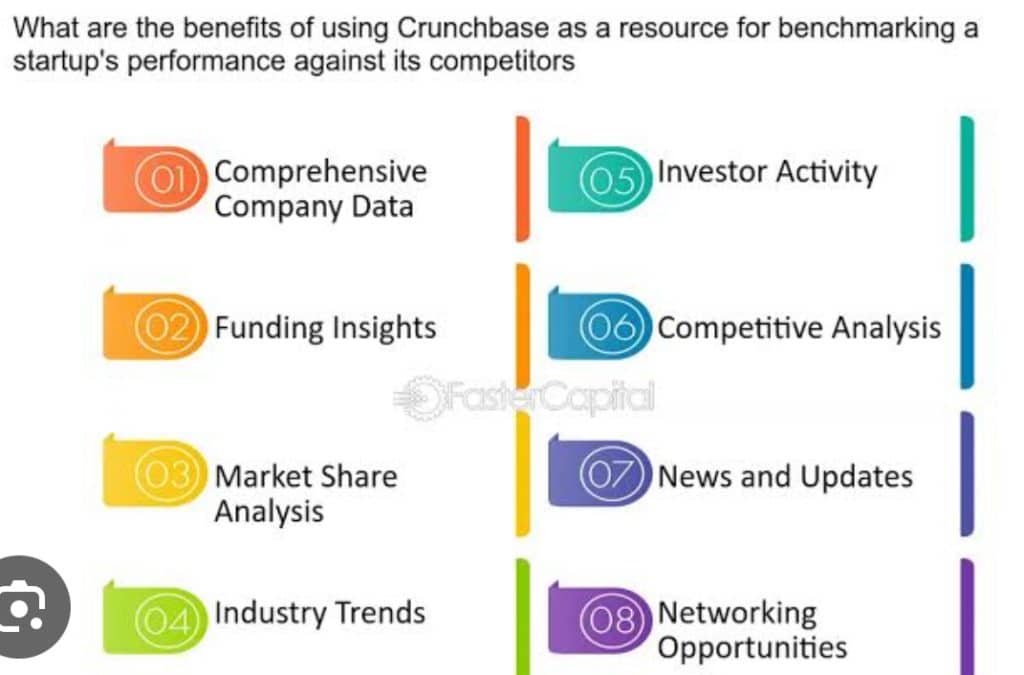
A complete Crunchbase company profile gives people a clearer snapshot of your business. It helps show what you do, where you operate, who is involved, and where someone can learn more.
Start with accurate basics, keep the profile updated, and treat it as one part of your larger online presence. If your company needs more than a business listing, Blue Crocus Solutions offers digital marketing services/SEO services to help local and service-based businesses improve visibility and generate better leads online.
If you are trying to improve your broader online visibility beyond directory listings, Blue Crocus Solutions can help you review your current SEO strategy and identify areas that may be limiting your search presence. Just give us a call!