
6 REAL Reasons Why You Need A Mobile-Optimized Website
We’ve all heard the saying, “If you build it, they will come.” But what about that other saying: “If you build it right, they&...
If you own a domain name — especially for your business — there’s a good chance you’ve already received one of these “official-looking” letters in the mail. Or you will. Today, I want to break down what these letters are, why they’re so misleading, and what you need to check before spending hundreds of dollars on something that should cost you less than twenty bucks a year.
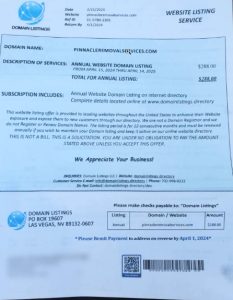
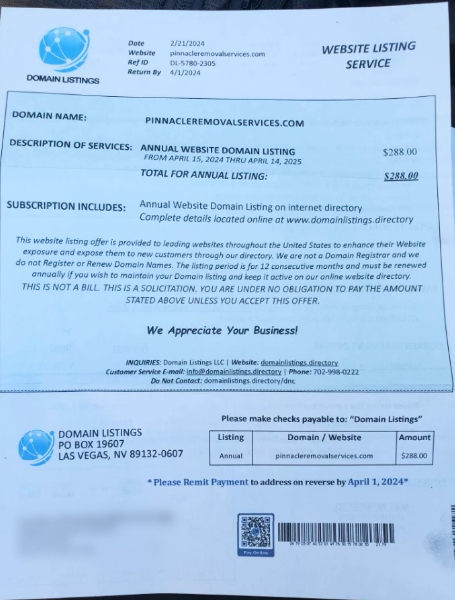
A client of mine recently sent me a picture of a piece of mail he got at his business address. It looked super official. It had his correct domain listed, a QR code, a barcode, a breakdown of “services,” and a big price tag — almost $300 to supposedly “renew” his domain.
I see this kind of thing at least once a month. The format looks different depending on who sends it, but the goal is always the same — get you to pay way more than you need to for your domain name by making it look urgent and legitimate.
Here’s the thing: it matched up with his actual domain, so it grabbed his attention. And that’s exactly what they’re hoping for — that you panic, assume it’s a bill, and just pay it.
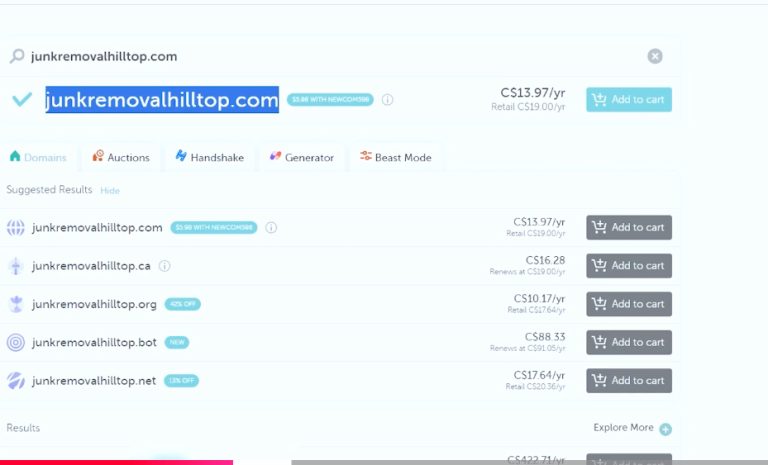 The first thing that jumped out at me was the price. They wanted him to pay nearly $300 for a domain renewal. That’s wild.
Most standard domains — the kind you’d buy on sites like Namecheap — cost between $10 and $20 per year.
Unless you’re buying a premium domain (something super short or keyword-rich), it should never cost you anywhere near $300. That’s your first red flag.
The second red flag? The letter said he had to pay this company to keep his domain active. But that’s not how it works. You only need to pay the domain registrar — the company you actually bought the domain from, like GoDaddy, Namecheap, Bluehost, etc.
So let’s figure out how to check where your domain is really registered.
If you’re not sure where your domain is registered — no worries. A lot of people forget. Here’s exactly how you check.
Search for: “WHOIS domain”
Then click on a tool like: whois.domaintools.com or whois.com
Once you’re there:
Enter your domain name (like yourbusiness.com)
Complete the CAPTCHA if prompted
Hit search
It’ll bring up your domain registrar — for example, Namecheap, which is where this client had his domain. That’s your proof.
Once you know the registrar, go into your email and search for something like:
“Namecheap invoice”, “domain renewal”, or “domain registration”
You should see emails from the real domain provider. That’s how you confirm you’ve already paid — and probably paid way less than whatever that letter is asking for.
The reason this trick works is because:
The letter includes your real domain name
It uses legal-sounding language and formatting
It often includes “deadlines” or “payment required” messaging
It’s sent by mail, which gives it a sense of urgency and formality
If you’re busy running your business, it’s easy to glance at it and assume it’s real. That’s why I made this post — to help you spot it and not get tricked.
Here’s what to do if you get something like this:
Don’t panic
Don’t pay anything right away
Check where your domain is registered using WHOIS
Verify your last renewal email or receipt
Shred or toss the letter once you know it’s a scam
Again, here’s what you should expect:
Standard domain: $10–$20/year
Premium domain (rare): Can be higher — but you’ll know if you bought one
Email hosting, website hosting, SSL certificates: These are separate costs and usually explained clearly when purchased from real providers
If you’re being charged hundreds of dollars just for the domain name, that’s not normal.
These kinds of scams don’t stop at domains. People also get:
Phone calls about “expiring Google Business listings”
Emails asking for “SEO listing renewal”
Texts claiming “urgent website security updates required”
If something feels off — it probably is. Ask questions. Do your homework. Or reach out to someone who knows how to double-check it for you.
Big shoutout to Pinnacle Removal Services for allowing me to use their example to educate others. This stuff is important, and it helps the whole small business community stay sharp and protected.
The internet can be a minefield sometimes — but it doesn’t have to be. I’m here to help you navigate it, avoid scams, and grow a business you’re proud of.