

6 REAL Reasons Why You Need A Mobile-Optimized Website
We’ve all heard the saying, “If you build it, they will come.” But what about that other saying: “If you build it right, they&...
A Google Review Tap Card is a modern, digital business card powered by NFC (Near Field Communication) technology that directs your customer straight to your Google Review page on their phone. Instead of handing out a paper card, you simply tap your card on someone’s smartphone.
You can program your card to share various types of information, such as
It’s like magic, but better. It’s an immediate connection at your fingertips.
1. Instantly Share Your Google Reviews
One tap takes customers straight to your 5-star reviews. People trust what others say, and now they don’t have to search for it. The easier you make it for customers to leave reviews, the more likely they are to.
2. No More Lost Opportunities
No one loses a tap. The info goes straight to their phone, where they can save your contact, visit your site, or even book you.
3. Update Info Without Reprinting Cards
Need to change your number, hours, website, or address? These cards are easy to reprogram. We will show you how later, keep reading!
4. Shows You’re Legit
A digital tap card connected to your verified Google Business Profile builds trust fast. It tells customers: “I’m the real deal.”
5. Great First Impression
In under 3 seconds, you can go from stranger to pro with a slick, futuristic tap. That moment? Memorable.
6. Eco-Friendly & Always With You
No paper waste. No stacks of cards. Just one sleek tap card in your wallet or on your phone case.
Imagine this…
You finish a job, Customer says, “What’s your info?”
Instead of fumbling in your truck for a stack of cards you saw two months ago or spit shining coffee stains off your dirt-smeared business card, you tap their phone with one easy card from your wallet.
Now they have your info, leave you a review, and refer you to their neighbor.
Boom. Quick. Easy. Review Done.
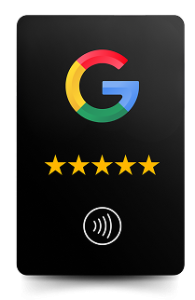
Get your programmed Google Tap Card and start growing your 5-star reviews, the smart way.
5 for $50 – Buy Here
10 for $70 – Buy Here
No! These cards are easy to reprogram! Follow these steps to update your card
First, we must erase the previous URL from the card.
1. Download NFC Tools app on your phone.
Apple Store: Download here
Google Store: Download here
2. Open the app and click “other”.
3. Click “erase tag”.
4. Place the tap card in front of the back-facing camera of your phone, 1 inch away, until it scans.
5. Ensure your record has been deleted, click “read” and scan the card when it says “Ready to Scan”.
6. If “Record 1” says “Empty”, the website URL has been removed from the tap card.
Now it’s time to program your card with your new URL!
1. Go to the main page of the app and click “Write”.
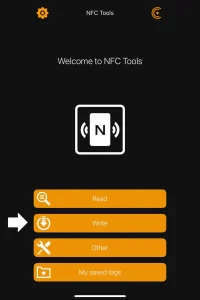
2. Click “Add a record”.
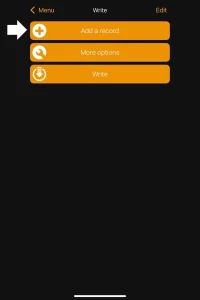
3. Click “URL” to add a website address.
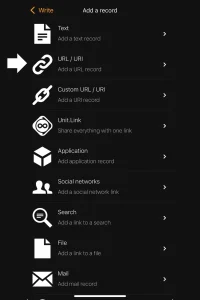
4. Enter the website URL and click “OK”.
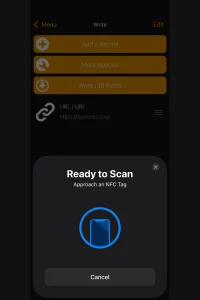
5. Once the website URL is listed below, click “write” to add the link to the card.
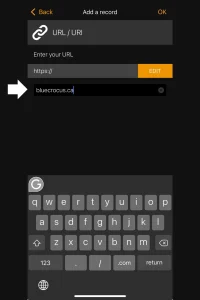
6. Place the tap card in front of the back-facing camera of your phone, 1 inch away, until it scans.
7. If the scan was successful, a banner at the top of your phone will appear when you place the card 1 inch away from your back-facing camera for 2 seconds.
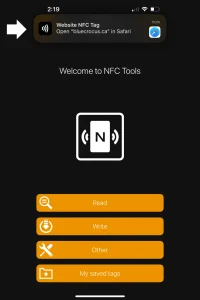
Now you have successfully updated your Google Review Tap Card! Enjoy the convenience and the growth of all the new reviews to come!